Quick Start
在开始前,请先完成安装和模型配置。
使用 SRHarness 发现一个已知方程
SRHarness 提供了方便的测试命令,允许根据指定的公式合成数据,再检查 Agent 从数据中还原公式的能力。
下面生成包含 x1、x2、y 三列的数据,其中目标变量 y 满足
\[
y = 1 + x_1^2 + 2x_1x_2.
\]
Tip
运行前请配置与 --llm-provider 对应的 API Key。下面的示例使用 OpenRouter,因此需要配置 OPENROUTER_API_KEY;如果使用其他 Provider 的 API Key,请相应修改 --llm-provider 和 --llm-model。
然后以较小搜索预算启动 Agent:
sr-harness synthetic \
  --equation 'y = 1 + x1 ** 2 + 2 * x1 * x2' \
  --n-samples 200 \
  --x-low -2 \
  --x-high 2 \
  --seed 42 \
  --llm-provider openrouter \
  --llm-model deepseek/deepseek-v4-flash-0731 \
  --save-path ./logs/quick-start \
  -R 1 -C 1 -L 10 -K 1
四个预算参数分别是:
| 参数 | 含义 |
|---|---|
-R |
Restart 次数 |
-C |
每个 Restart 的独立 Conversation 数 |
-L |
每条 Conversation 的最大 Refinement 深度 |
-K |
每一步的模型采样数 |
运行记录写入 --save-path,常见文件如下表所示:
| 文件 | 内容 |
|---|---|
run.json |
本次运行的唯一标识、启动参数和 Agent 配置 |
nodes.jsonl |
搜索期间产生的对话节点和节点间关系 |
result.json |
Agent 探索的公式列表,以及构成帕累托前沿和最佳结果的候选公式 |
response.jsonl |
原始模型响应、token 和费用统计 |
tool_calls.jsonl |
工具调用记录 |
$ sr-harness synthetic \
  --equation 'y = 1 + x1 ** 2 + 2 * x1 * x2' \
  --n-samples 200 \
  --x-low -2 \
  --x-high 2 \
  --seed 42 \
  --llm-provider openrouter \
  --llm-model deepseek/deepseek-v4-flash-0731 \
  --save-path ./logs/quick-start \
  -R 1 -C 1 -L 10 -K 1

[20261009_synthetic_173140_SIM1|synthetic|N|Oct09 17:31:40|0:00:00.000742] Args: Namespace(command='synthetic', name='synthetic', exp_name='20261009_synthetic_173140_SIM1', save_dir='./logs/synthetic', equation='y = 1 + x1 ** 2 + 2 * x1 * x2', problem_description=None, features=None, n_samples=200, seed=42, x_low=-2.0, x_high=2.0, noise_std_ratio=0.0, llm_provider='openrouter', llm_model='deepseek/deepseek-v4-flash-0731', strong_llm_provider=None, strong_llm_model=None, tools=None, ban_tools=[], local_sample_size=1, max_refinement_depth=10, global_width=1, max_restart_loop=1, restart_top_k=1, llm_max_tokens=4096, tool_parser='openai', save_path='logs/quick-start', verbose=False, debug=False, max_workers=0, validation_fraction=0.2, split_by='random', split_ood_variable=None, split_random_state=42, force_initial_diagnostics=True, auto_routing=True, invocation='sr-harness synthetic')
[20261009_synthetic_173140_SIM1|sr_agent|I|Oct09 17:31:40|0:00:00.014988] Initialized SRAgent
[20261009_synthetic_173140_SIM1|sr_agent|I|Oct09 17:31:40|0:00:00.019464] Start Restart Loop (R=1/1)
[20261009_synthetic_173140_SIM1|sr_agent|I|Oct09 17:31:40|0:00:00.020326] (R=1/1) × Global Branch (C=1/1)
[20261009_synthetic_173140_SIM1|sr_agent|I|Oct09 17:31:40|0:00:00.020527] (R=1/1) × (C=1/1) × Refinement Step (L=1/10)
[20261009_synthetic_173140_SIM1|sr_agent|I|Oct09 17:31:40|0:00:00.040948] Built prompt with 4 messages.
[20261009_synthetic_173140_SIM1|sr_agent|I|Oct09 17:31:40|0:00:00.153329] Model route: tier=base, backend=openrouter/deepseek/deepseek-v4-flash-0731, score=0, reason=no distinct strong backend configured
[20261009_synthetic_173140_SIM1|sr_agent|I|Oct09 17:31:55|0:00:14.662623] (R=1/1) × (C=1/1) × (L=1/10) × Local Sample (K=1/1)
        LLM response content: (empty)
        LLM tool calls: (3 tool calls)
[20261009_synthetic_173140_SIM1|sr_agent|I|Oct09 17:31:55|0:00:14.753144] Selected LLM branch: 1/1
[20261009_synthetic_173140_SIM1|sr_agent|I|Oct09 17:31:55|0:00:14.765089] Progress=(R=1/1) × (C=1/1) × (L=1/10) × (K=1) | Best=1 + 2 * (x1 * x2) + 1 * x1 ** 2 (validation MSE=2.3692e-30) | Tool Calls=statistics_analysis: 1 (0 new), relationship_analysis: 2 (1 new), read_skill: 1 (0 new), polynomial_fit: 1 (1 new), call_sindy: 1 (1 new) | Speed=0 s/iter | Time Usage=14.7 s (request_llm=14.5 s/iter[98%]; prepare_model_messages=133 ms/iter[1%]; execute_tool_calls=81.6 ms/iter[1%]; record_search_iteration=6.01 ms/iter[0%]; create_initial_buffer=859 μs/iter[0%]; update_conversation=478 μs/iter[0%]; init_buffer=204 μs/iter[0%]; collect_candidates=50.3 μs/iter[0%]) | Token Usage=14 ktoken (prompt=890 token/s[93%]; answer=63.3 token/s[7%]) | Price Usage=1.37 m$ (total=8.05 $/day[100%])
[20261009_synthetic_173140_SIM1|sr_agent|I|Oct09 17:31:55|0:00:14.765574] (R=1/1) × (C=1/1) × Refinement Step (L=2/10)
[20261009_synthetic_173140_SIM1|sr_agent|I|Oct09 17:31:55|0:00:14.765853] Built prompt with 9 messages.
[20261009_synthetic_173140_SIM1|sr_agent|I|Oct09 17:31:55|0:00:14.867024] Model route: tier=base, backend=openrouter/deepseek/deepseek-v4-flash-0731, score=0, reason=no distinct strong backend configured
[20261009_synthetic_173140_SIM1|sr_agent|I|Oct09 17:32:10|0:00:29.998812] (R=1/1) × (C=1/1) × (L=2/10) × Local Sample (K=1/1)
        LLM response content:
                The polynomial fit found the exact formula: y = 1 + 2·x1·x2 + x1² with RMSE ~1.7e-15 (machine precision). This is
                essentially exact. Let me verify and submit it.
        LLM tool calls: (2 tool calls)
[20261009_synthetic_173140_SIM1|sr_agent|I|Oct09 17:32:10|0:00:30.046342] Selected LLM branch: 1/1
[20261009_synthetic_173140_SIM1|sr_agent|I|Oct09 17:32:10|0:00:30.054810] Progress=(R=1/1) × (C=1/1) × (L=2/10) × (K=1) | Best=1 + x1 ** 2 + 2 * x1 * x2 (validation MSE=0) | Tool Calls=statistics_analysis: 1 (0 new), relationship_analysis: 2 (0 new), read_skill: 1 (0 new), polynomial_fit: 1 (0 new), call_sindy: 1 (0 new), evaluate_formula: 1 (1 new), submit_formula: 1 (1 new) | Speed=14.7 s/iter | Time Usage=30 s (request_llm=14.8 s/iter[99%]; prepare_model_messages=117 ms/iter[1%]; execute_tool_calls=59.8 ms/iter[0%]; record_search_iteration=6.27 ms/iter[0%]; log_info=12 ms/iter[0%]; update_conversation=667 μs/iter[0%]; create_initial_buffer=859 μs/iter[0%]; init_buffer=204 μs/iter[0%]; collect_candidates=86.4 μs/iter[0%]) | Token Usage=32.5 ktoken (prompt=1.03 ktoken/s[95%]; answer=50.9 token/s[5%]) | Price Usage=2.38 m$ (total=6.85 $/day[100%])
[20261009_synthetic_173140_SIM1|sr_agent|N|Oct09 17:32:10|0:00:30.055465] Early stopping triggered. Returning best result.
[20261009_synthetic_173140_SIM1|synthetic|N|Oct09 17:32:10|0:00:30.099796]
        ==================================================
        Symbolic Regression Result
        Start Time: 2026-10-09 17:31:40
        Duration Seconds: 30.759567
        Target Formula: y = 1 + x1 ** 2 + 2 * x1 * x2
        Noise Std Ratio: 0.0
        Random Seed: 42
        Status: early_stopped
        Progress: (R=1/1) × (C=1/1) × (L=2/10) × (K=1)
        Token Usage: 32.5 ktoken
        Money Usage: 2.38 m$
        Tools Usage: 8 call (relationship_analysis=2 call[25%]; statistics_analysis=1 call[12%]; read_skill=1 call[12%]; polynomial_fit=1 call[12%]; call_sindy=1 call[12%]; evaluate_formula=1 call[12%]; submit_formula=1 call[12%])
        Llm Model: deepseek/deepseek-v4-flash-0731 @ openrouter [autorouting to deepseek/deepseek-v4-flash-0731 @ openrouter]
        Best Candidate: 0
        Times Usage: 30 s (request_llm=14.8 s/iter[99%]; prepare_model_messages=117 ms/iter[1%]; execute_tool_calls=59.8 ms/iter[0%]; log_info=10.1 ms/iter[0%]; record_search_iteration=6.27 ms/iter[0%]; update_conversation=667 μs/iter[0%]; create_initial_buffer=859 μs/iter[0%]; init_buffer=204 μs/iter[0%]; collect_candidates=86.4 μs/iter[0%])

        Pareto Front
        Balance: minimize Complexity; maximize Validation R².
        =================================================================
        #  Complexity  Validation R²  Train R²  Formula
        -----------------------------------------------------------------
        1          11              1         1  1 + x1 ** 2 + 2 * x1 * x2
        =================================================================
        ==================================================
[20261009_synthetic_173140_SIM1|synthetic|N|Oct09 17:32:10|0:00:30.101931] Result saved to logs/quick-start/result.jsonl
[20261009_synthetic_173140_SIM1|synthetic|N|Oct09 17:32:10|0:00:30.102261] Experiment completed. Re-run the script with sr-harness synthetic
使用 WebUI 工作台
SRHarness 提供了交互式 WebUI 工作台,允许用户在浏览器中完成数据准备、任务配置和符号回归搜索。
下面的命令在本机 8000 端口启动 WebUI,并将持久化工作区和运行记录分别保存到 ./workspaces 与 ./logs/webui:
sr-harness run \
  --host 127.0.0.1 \
  --port 8000 \
  --workspace-dir ./workspaces \
  --save-path ./logs/webui
在浏览器中打开 http://127.0.0.1:8000/,并按网页提示进行如下三个阶段的操作:
- 数据准备:上传数据(或使用网页提供的样例数据),并在必要时让网页内的 Agent 清洗、补充或检查数据。
- 任务配置:选择变量角色,编辑变量和问题描述,并选择或定义模型评价方案。
- 符号回归:启动符号搜索,并在必要时回到前两步以补充变量或更改评价方案。
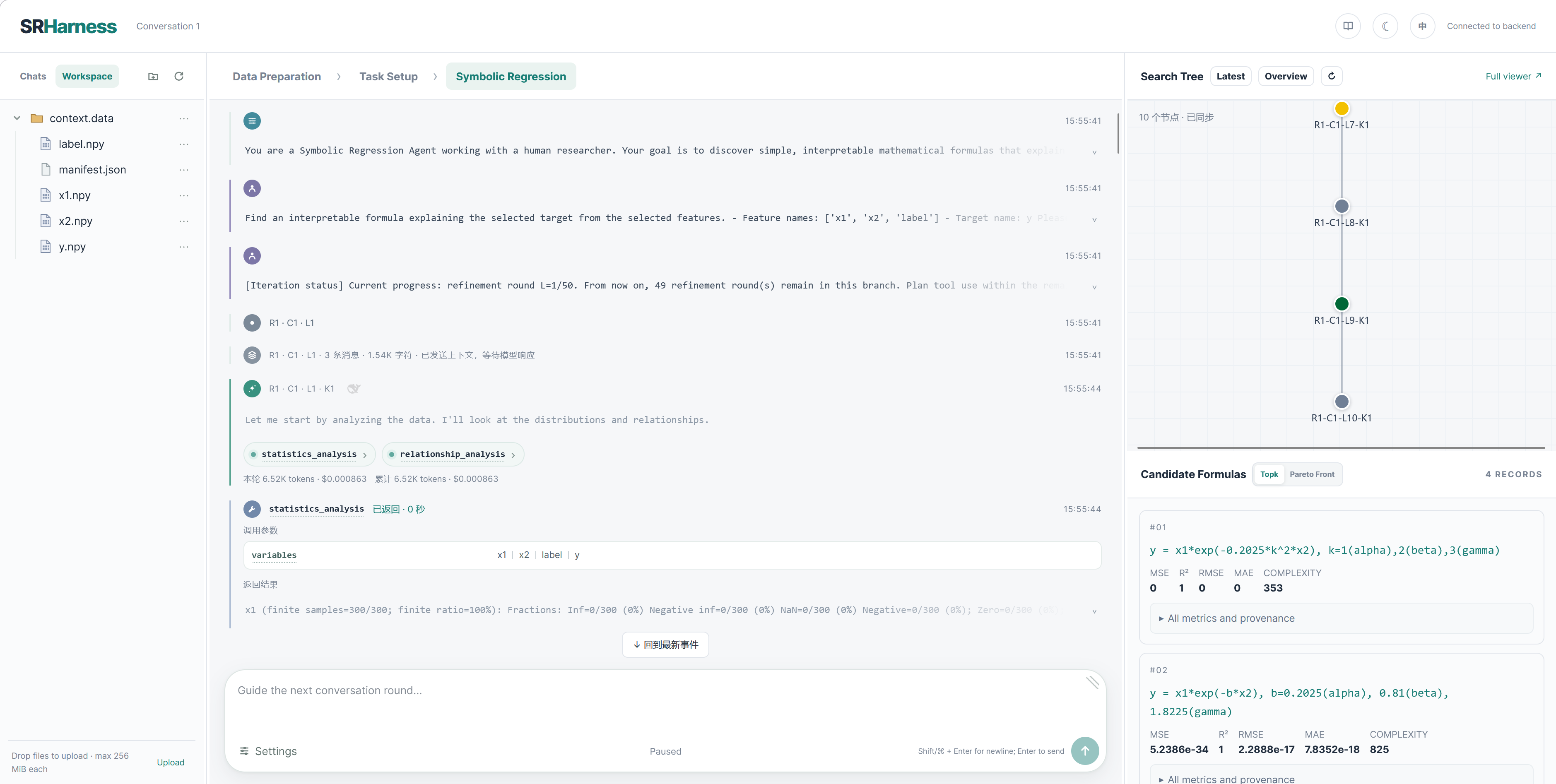
完整操作说明见 SRHarness 网页工作台。
使用只读数据挂载
如果数据较大,建议通过 --mount 将本机数据挂载到工作区:
挂载的数据将以只读链接的形式出现在每个对话的工作区,避免原始数据被 Agent 修改或复制数据占用额外的磁盘空间。如果指定了多个要挂载的目录或文件,不同目录或文件的名称不得相互冲突。
使用在线 WebUI 工作台
如果不希望在本地部署,也可以直接访问我们提供的在线 WebUI 工作台,在浏览器中体验数据准备、任务配置和符号回归流程。