SRHarness WebUI
The WebUI organizes a study into three ordered stages: Data Preparation → Task Setup → Symbolic Regression. The left panel manages conversations and files, the center hosts the active workflow, and the right panel shows data previews or search results.
Launch
sr-harness run \
  --host 127.0.0.1 \
  --port 8000 \
  --workspace-dir ./workspaces \
  --save-path ./logs/webui
Open http://127.0.0.1:8000/.
Layout
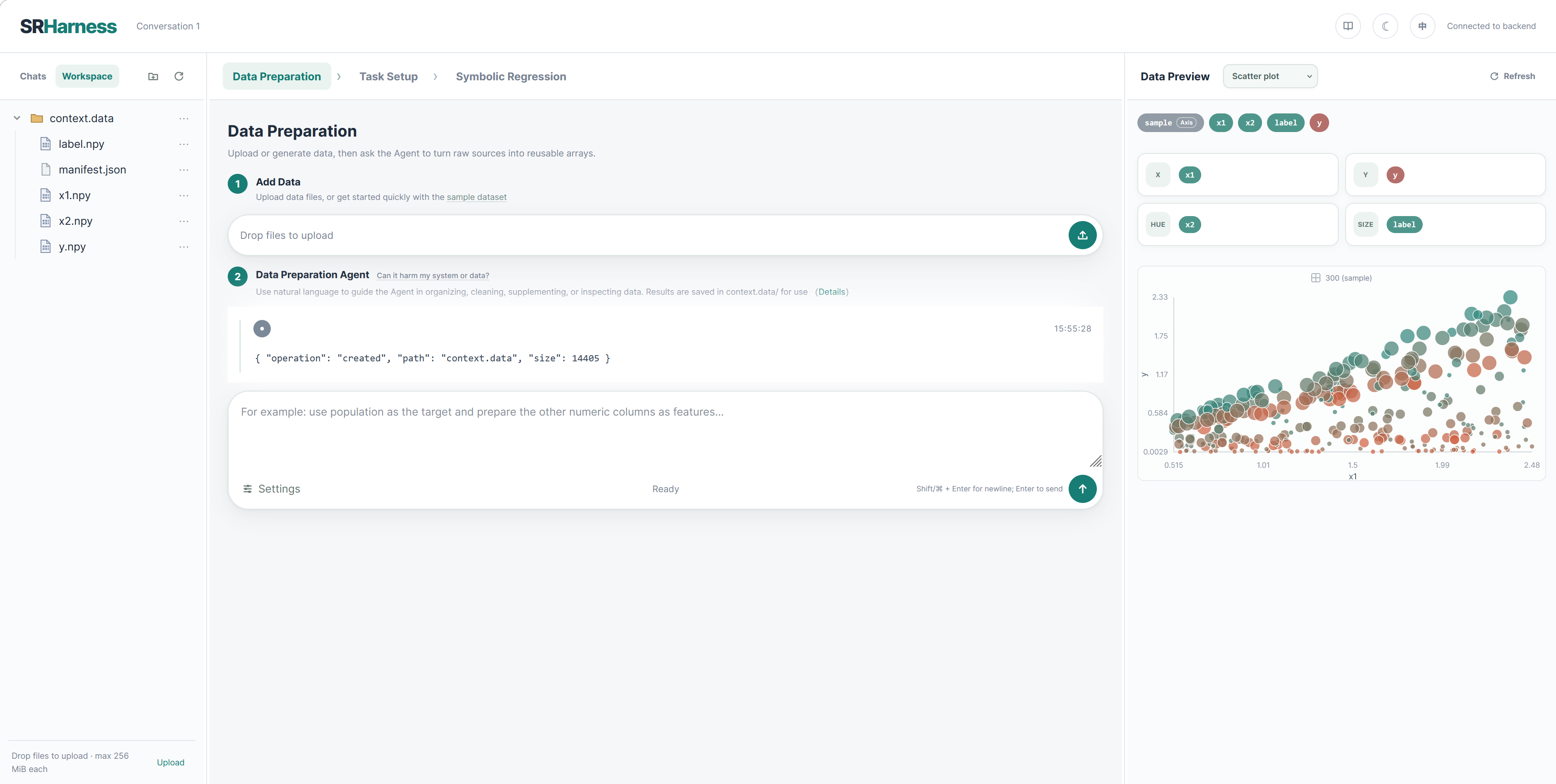
| Area | Purpose |
|---|---|
| Header | Conversation name, language, color mode, connection and run status |
| Left panel | Conversations/workspace switch, file upload and management |
| Center tabs | Data Preparation, Task Setup, Symbolic Regression |
| Right panel | Data and relationship previews, or search tree and candidates |
Each conversation owns an Agent workspace, a private session directory, and an InteractiveSession. Switching conversations therefore switches data, timelines, settings, and search state. See Save paths and workspaces for the directory layout.
1. Data Preparation
Drop a file onto the upload bar or use its icon. The refresh action reloads context.data/. Four built-in datasets are available: polynomial regression, grouped parameters, an oscillatory ODE, and Kuramoto dynamics on a 10-node BA network.
The Data Preparation Agent can inspect files, clean data, derive variables, and write structured arrays. For example:
Read trajectory.csv, estimate dx_dt with central differences, retain t and x, and document meaning and units in the manifest.
The Agent should run validate_context_data after writes. InteractiveSession only loads valid files into the shared AgentContext.
See The context.data Format for the complete manifest, NPY, axis, and graph-structure rules.
Composer shortcuts are Enter to send and Shift+Enter or Command+Enter for a newline. While an Agent is running, the first stop click requests a pause at a safe boundary; a second click interrupts the current stream or tool call to reach that boundary sooner.
Agent permissions and data safety
Data Preparation Agent and Evaluator Construction Agent use model-generated tool calls to read source material, execute restricted code, and modify their workspaces. They do not receive an unrestricted system shell, but some tools can create, overwrite, move, or delete workspace content. Treat an ordinary writable workspace as an area under Agent control.
Do not place the only copy in a writable workspace
The WebUI lock reduces accidental modification but is not a security boundary against malicious code. Keep an independent backup of irreplaceable data and prefer read-only mounts when supplying it to SRHarness.
Default capabilities have the following effects:
| Tool | Capability and impact |
|---|---|
workspace_shell |
Performs a restricted set of file inspection, copy, move, deletion, creation, and extraction operations inside the workspace. It uses an SRHarness command parser rather than a system shell. |
workspace_code_executor |
Runs restricted Python in a separate process for NumPy, SciPy, pandas, and CSV transformations. It can modify the writable workspace but cannot access paths outside it or read-only mounts. |
web_search / web_fetch |
Queries public search services or public HTTP/HTTPS pages. web_fetch rejects private-network targets, credential-bearing URLs, and restricted redirects. |
read_pdf |
Reads workspace PDFs or public URLs without modifying the source. |
read_skill |
Reads instructions and supporting files from enabled Skills; a Skill may influence subsequent tool selection and operations. |
validate_context_data |
Validates context.data and reports actionable errors without directly mutating the loaded AgentContext. |
Disable unneeded tools under Settings → Capabilities for each Agent. Custom tools and Skills can expand the effective capabilities beyond this table.
workspace_shell supports only preimplemented commands such as ls, cat, grep, cp, mv, rm, mkdir, gzip, unzip, and tar. It does not support arbitrary program execution, a system shell, command substitution, environment expansion, redirection, or background jobs. Absolute paths, .. traversal, and symlinks that escape the workspace are rejected.
workspace_code_executor no longer relies on an AST allowlist to decide whether Python source is safe. Every call starts a short-lived operating-system sandbox that uses Landlock for filesystem confinement and seccomp to deny networking, child-process creation, and host-management system calls. The worker receives a sanitized environment and limits wall time, address space, file size, open files, and captured output. If the kernel cannot provide the required isolation, execution is refused.
code_executor and evaluate_code receive only the current data and ephemeral scratch space. workspace_code_executor additionally receives read-write access to the current conversation workspace and read-only access to explicitly mounted inputs. The Python runtime and installed scientific packages remain visible read-only so NumPy, SciPy, pandas, and similar dependencies can be imported. Custom Evaluators execute through the same data-only sandbox.
SRHarness offers two read-only mechanisms:
- paths supplied through
sr-harness run --mount PATH ...are application-level read-only inputs and cannot be unlocked from the WebUI; - manually selecting Lock in the workspace removes write permission and adds checks to built-in workspace interfaces. The same operating-system user can in principle restore permissions, so this mechanism primarily prevents accidental modification.
For stronger protection, run SRHarness as a dedicated unprivileged system user and have an administrator expose original data through a kernel-enforced read-only bind mount, read-only container volume, or read-only storage snapshot:
sudo mount --bind /data/original /mnt/srh-original
sudo mount -o remount,bind,ro /mnt/srh-original

sudo -u srharness sr-harness run \
  --workspace-dir /srv/srharness/workspaces \
  --mount /mnt/srh-original
When the SRHarness process has neither root privileges, CAP_SYS_ADMIN, nor source-directory write permission, an Agent cannot turn the kernel read-only mount back into a writable one. An offline or immutable backup remains the final safeguard for irreplaceable data.
2. Task Setup
Variables and problem
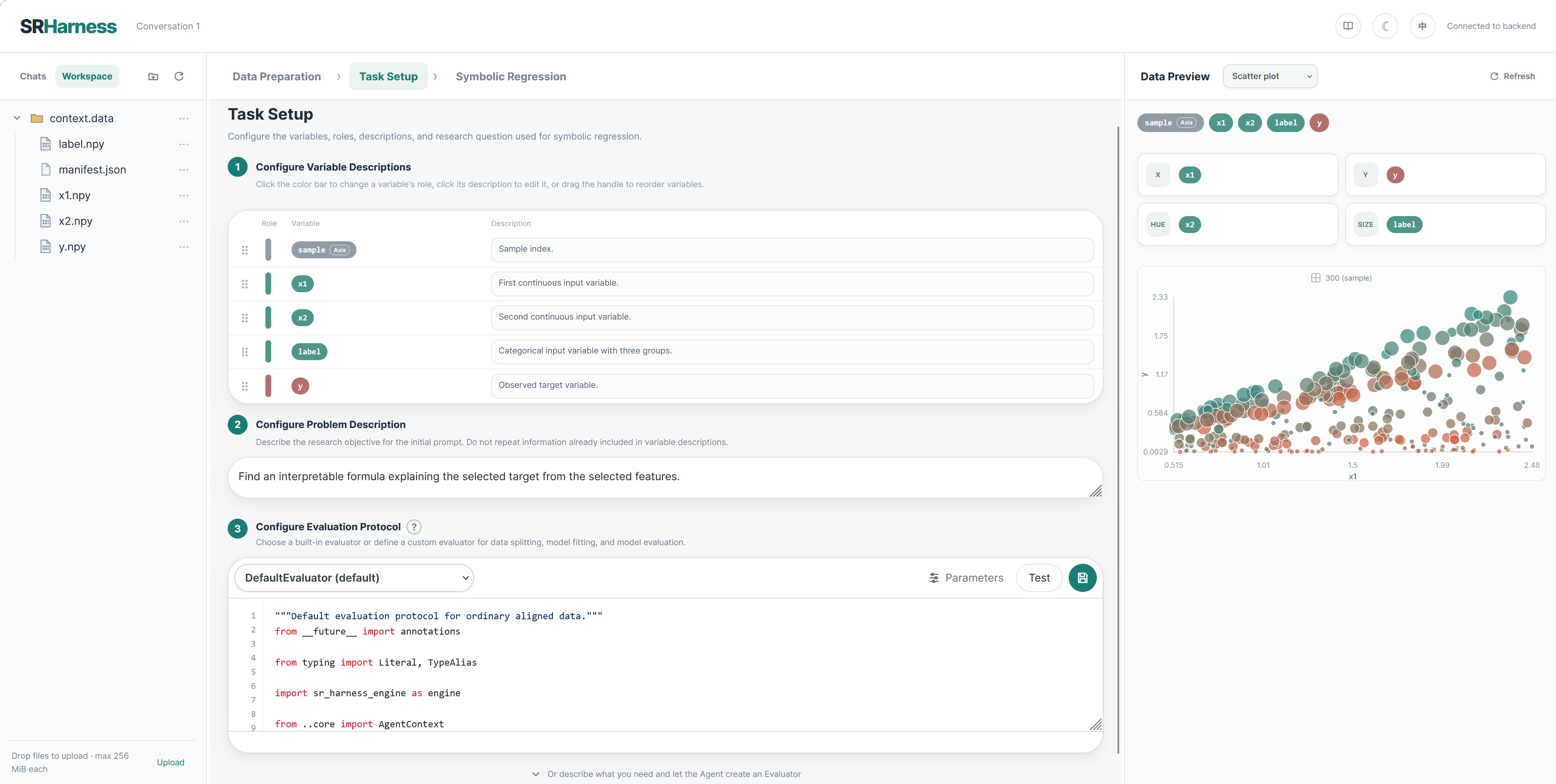
Assign the target, features, and unused variables, then edit their descriptions. Descriptions are synchronized with context.data/manifest.json. They should document scientific meaning, units, and constraints without leaking the answer.
The problem description participates in user-prompt generation, for example:
Find a compact equation for dx_dt using x and t. Prefer a stable, interpretable model.
Evaluation protocol
The selector contains built-in Evaluators and custom scripts from context.evaluator/. A script that cannot load remains visible with an error marker and message.
- Arguments edits relevant
context.args.*values, including splitting and ranking. - Test validates the current Evaluator against the best formula, or a trivial linear formula when no candidate exists.
- Save stores edited source as a custom Evaluator.
- Evaluator Construction Agent creates or repairs an Evaluator from a natural-language request and is collapsed by default.
A custom file must define exactly one DefaultEvaluator subclass. Its extension points are split, fit, evaluate, fit_candidate, and evaluate_candidate; candidate-only methods are particularly useful for ODE rollouts.
3. Symbolic Regression
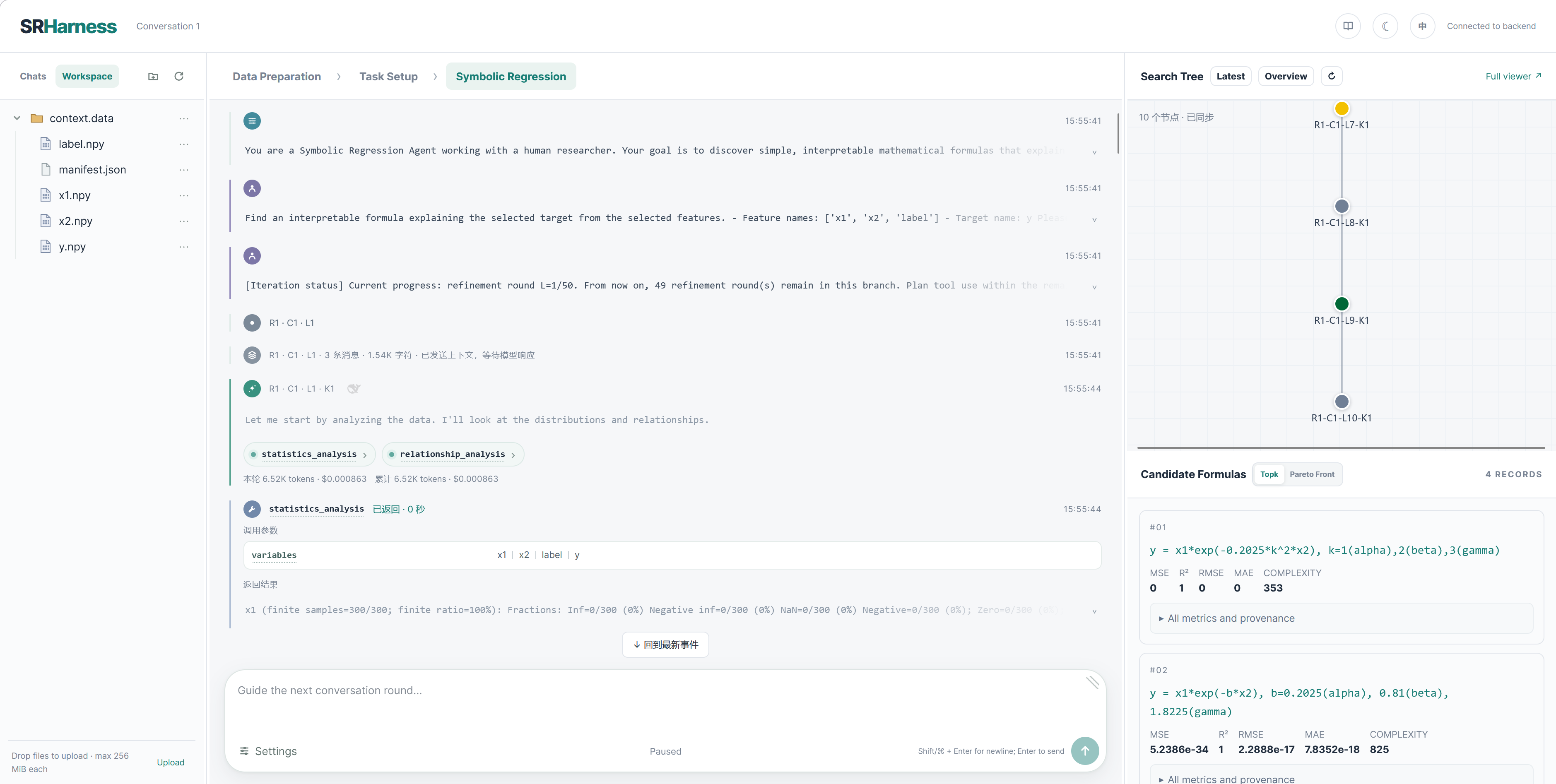
Before starting, review variable configuration, the generated editable user prompt, the built-in editable system prompt, and model/search/tool/skill settings. Emptying a prompt does not regenerate it; regeneration happens only through its explicit button.
Both system and user prompts appear as timeline cards after the search starts.
Timeline events
Unless documented otherwise, each backend interaction event is rendered as one card: a prompt added to the buffer, model-context summary, reasoning or assistant response, tool call, tool result, or state/control message. Context cards show message and character counts and link to the full Current Context view. A tool result with ToolCallResult.ok == false receives a red error icon but remains a normal wrapped result sent back to the Agent.
Messages and pause control
- Idle with text: the arrow sends immediately.
- Running with text: the arrow queues guidance for the next safe boundary.
- Running without text: the square requests a pause.
- Pause already requested: the red square interrupts the current stream or tool execution.
An assistant response with no tool call simply ends the turn and waits for another user message. There is no separate ask_human tool or state.
Search tree and candidates
The search tree groups nodes by R–C–L coordinates. Candidate views include Top-k, ordered by ranking_metric, and the Pareto Front, normally comparing that metric with complexity. A timeline coordinate or tree node opens the exact buffer used for that model request. New numeric Evaluator metrics enter train/validation results and can be selected for ranking.
End-to-end dynamics example
- Upload a
(t, x)trajectory. - Ask Data Preparation Agent to estimate
dx_dtand validate the context. - Preview all three variables.
- Set
dx_dtas target andx,tas features. - Run an initial search with
DefaultEvaluator. - Pause and return to Task Setup.
- Ask Evaluator Construction Agent for a tested
rollout_rmsemetric. For example:
Create a TrajectoryRolloutEvaluator derived from DefaultEvaluator. Keep the default metrics and add rollout_rmse by integrating candidate ODEs in evaluate_candidate.
- Select
rollout_rmseasranking_metric. - Return to Symbolic Regression and ask the Agent to continue with the revised evaluation.
The Current Pareto Front and evaluate_formula results then include the new metric, allowing the Agent to balance complexity, pointwise error, and trajectory error.
Multi-user and security boundaries
--isolate-users filters conversation listings by cookie. --mount inputs are read-only to Agents, while ordinary workspace files may be modified. Credentials, proxy, tools, and skills are configured separately for each Agent. Public deployment still requires external authentication and network access control.
See SRHarness for CLI and persistence details.